← KamTech Solutions

Your Home Assistant™, made simpler for everyone at home

Nebula is an open, do-it-yourself add-on for the Home Assistant™ you already run. It puts your lights, music, weather, lists and family games behind a wall panel, a phone app and a voice assistant, and it keeps control of your devices inside your home.
Early development — Nebula isn't a finished, ready-to-buy product yet. Everything on this page is built or being tested in our beta. Beta testers will be able to run the Cosmos UI on hardware they already own (a tablet or an Android™-enabled wall panel), and the Nebula Home app is coming to iOS.

It adds onto Home Assistant™. It doesn't replace it.

Home Assistant™ already connects a huge range of devices and runs in your own home. Nebula keeps all of that exactly as it is and gives the whole household an easier way to use it.

1. Your Home Assistant™

Your devices, rooms, scenes and automations. You install and run it; nothing here changes.

2. The Nebula integration

An open-source add-on (MIT) installed through HACS. It groups your devices by room, finds the app on your network and pairs it with one scan.

3. Panel, app and voice

The Cosmos UI on a wall panel, the Nebula Home app on your phone, and Nebula Assist answering "Hey Nebula".

Everything Nebula does

Built around what a family actually does with a smart home every day.

Cosmos UI panel

A wall panel the whole house can use

  • Tap to control lights, switches and scenes, grouped by room. You choose which devices appear.
  • Wake it by saying "Hey Nebula". The wake word is heard on the panel itself.
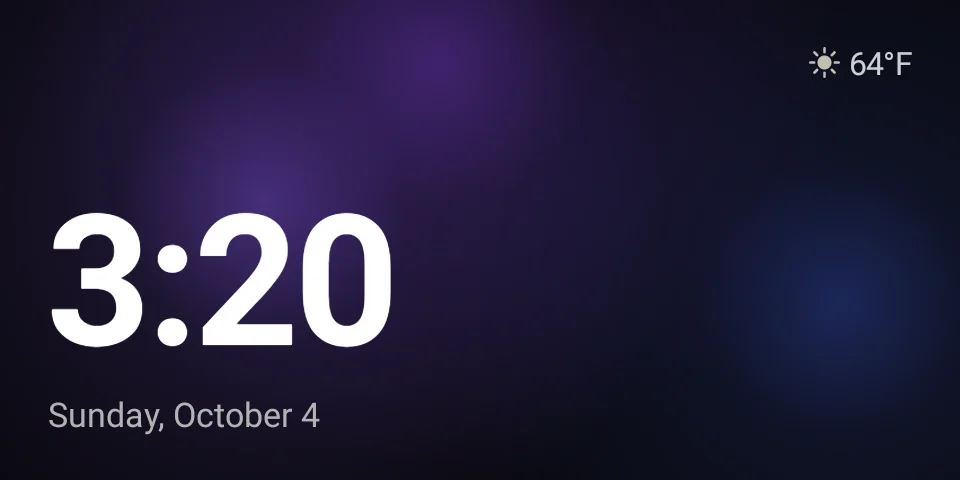
  • Ambient screensavers when it's idle: Nebula Drift, Big Type, Orbit, Station, Word Clock and Photo.
  • Night mode fades the screen to black so it doesn't light up the room.
  • Software updates arrive on their own.
Nebula Cosmos idle screensaver with a large clock, date and weather
UI preview, simulated
Dynamic weather

Weather screens that match the sky

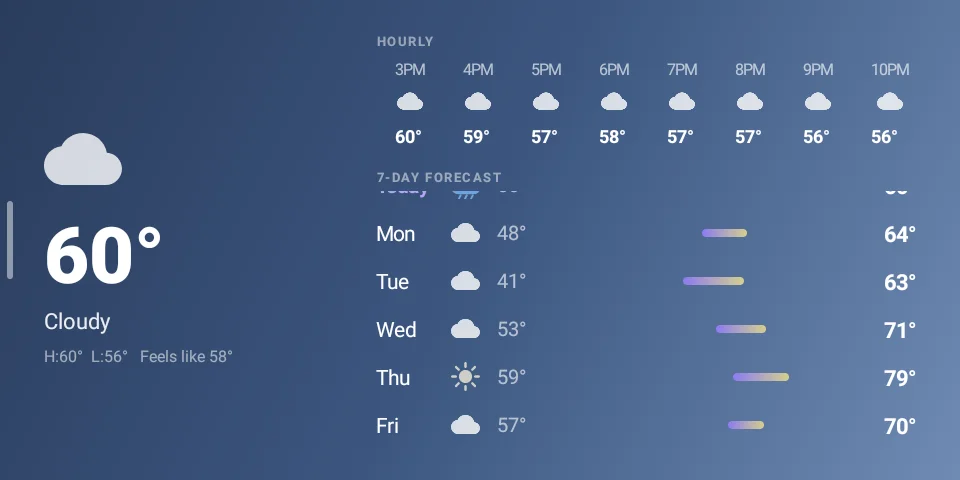
  • The forecast screen changes its whole mood with the conditions: bright days, deep night skies, rain and snow, heat, and storms with flashes of lightning.
  • Current conditions, an hourly row and a 7-day forecast at a glance.
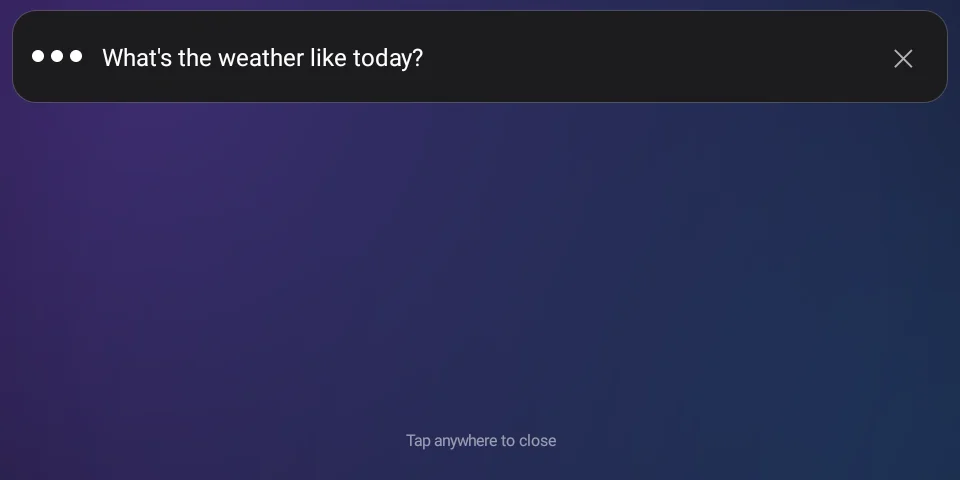
  • Ask "Hey Nebula, what's the weather?" and the forecast screen opens while it answers.
Nebula Cosmos weather screen with current conditions, hourly row and 7-day forecast
UI preview, simulated
Music

Spotify, radio and lyrics, room to room

  • Spotify: link your account once and control playback with Spotify Connect (Spotify Premium needed). Ask for a song, an artist or "some jazz" by voice.
  • "Play on…" sends the music to any room, from the panel or the app.
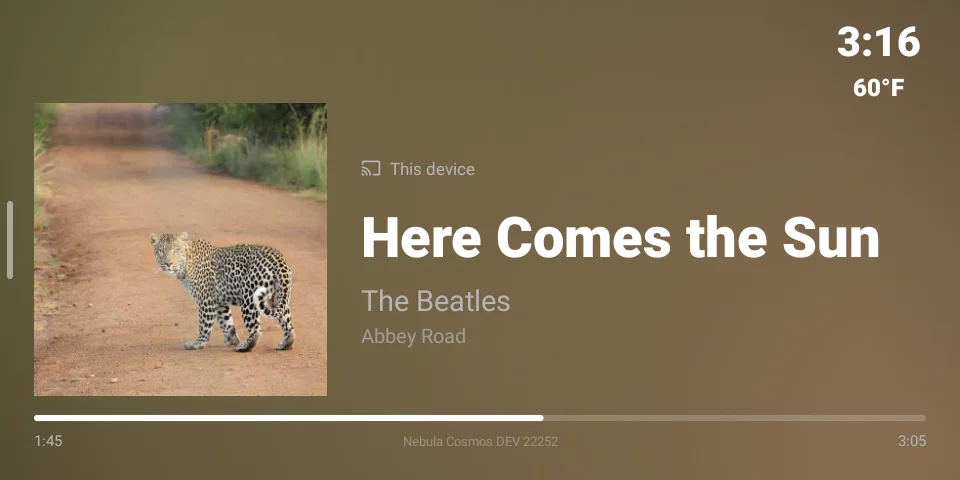
  • A full-screen Now Playing view with album art and synced lyrics.
  • Internet radio: search stations and save your favorites.
  • An equalizer, and Bluetooth audio ("switch to Bluetooth").
  • Whole-home media: see every receiver, TV and room in one view, change volume, input and surround mode, or turn it all off at once.
Nebula Cosmos full-screen Now Playing view with album art and a scrub bar
UI preview, simulated
Nebula Assist

A voice assistant that handles your home first

  • Local first: commands for your devices ("turn off the kitchen lights", "set a timer") go straight to your own Home Assistant™. They're fast and keep working even if the internet is down.
  • Say two things at once: "turn on the lights and play some jazz".
  • Ask "what can you do?" for a quick tour.
  • General questions you'd ask a search engine go to Google Gemini through your own Home Assistant™. How that data is handled.
  • Optional on-screen answers with pictures, if you add a search key.
Nebula Assist voice overlay with a live transcript
UI preview, simulated

Everyday basics

Timers and alarms, a shopping list you add to by voice, and reminders. The shopping list lives in your Home Assistant™, so it also shows up in its app.

Your calendar, on the wall

The Nebula Home app syncs upcoming reminders and events from your phone's calendar, including any iCloud, Google or Outlook calendar on your iPhone.

Family games

Say "let's play a game". Memory Match, Nebula Says, Tic-Tac-Toe and Star Tap on the screen, plus 20 Questions and Word Chain played by voice.

Nebula Home app

Coming soon to iOS. Pair a panel by scanning a QR code, control rooms, lighting and music from anywhere in the house. It uses your Home Assistant™ account, so there's no extra login.

Your home, your hardware, your rules

Runs in your home

Nebula runs on your own hardware and your own network, alongside your Home Assistant™. Device control doesn't go through our servers.

Nothing reaches in

The panel connects out to your Home Assistant™; nothing connects in to the panel. Each paired app or panel gets its own key, which you can see and revoke in your Home Assistant™ profile.

Your accounts stay yours

Your Spotify link is stored in your Home Assistant™, not on the panel, so wiping a panel never loses it.

Remove it any time

Your automations, devices and dashboards never move. Uninstall Nebula and Home Assistant™ carries on exactly as before.

Things that need the internet still use it: music from Spotify and radio stations, weather data, lyrics, and general questions answered by Google Gemini.

How Nebula compares

Amazon Alexa and Google Home are built around their own cloud and devices. Josh.ai is a premium system sold through professional installers. Nebula takes a different path: it builds on the Home Assistant™ you already own.

TopicNebulaAmazon AlexaGoogle HomeJosh.ai
Built onYour own Home Assistant™Amazon's cloud and Echo devicesGoogle's cloud and Nest devicesJosh.ai's own platform
Who sets it upYou (DIY), or book our optional Nebula installYouYouA professional dealer or integrator
Works withThe devices your Home Assistant™ already supportsDevices that work with AlexaDevices that work with Google HomeSystems supported by Josh.ai, usually installed with it
Controlling your devicesHandled by your own Home Assistant™, and keeps working when the internet is downGoes through Amazon's cloudGoes through Google's cloudSet by Josh.ai and your installer
Open sourceYes, Nebula's Home Assistant™ integrations (MIT)NoNoNo
If you stop using itRemove it; your Home Assistant™ setup is unchangedRoutines live in the Alexa appRoutines live in the Google Home appSet up and serviced through your dealer
CostIn early development. Nebula Assist is free for now, with an optional small monthly plan plannedBuy Echo devices; some newer features are part of paid plansBuy Nest devices; some features need a paid subscriptionPriced through your dealer, typically as part of a professional install
Available todayNot yet: beta comingYesYesYes, through dealers

Amazon Alexa, Google Home and Josh.ai details are from their public information as of October 2026, can change, and may vary by device and plan. They're well-established products; Nebula is a young project, and we'd rather tell you that plainly.

DIY, with help if you want it

  1. Have Home Assistant™ runningInstalled and set up by you. We don't install or configure Home Assistant™.
  2. Add NebulaInstall the open-source integration through HACS, from GitHub.
  3. Pair your panel and appOne QR scan links them to your Home Assistant™.
  4. Or let us install NebulaAn optional paid service covering Nebula only: the integrations, the Cosmos UI and mounting panels.

Questions about Nebula?

Ask through our contact form; it keeps every question in one place. A beta sign-up is on the way.

Ask about Nebula See the UI showcase

Home Assistant™ is a trademark of the Open Home Foundation (home-assistant.io, openhomefoundation.org). Nebula is a KamTech Solutions project that adds onto your existing Home Assistant™ installation; it doesn't replace it. It is not made, endorsed, or sponsored by the Open Home Foundation, Nabu Casa, Inc. or the Home Assistant™ project, and KamTech Solutions has no legal partnership, affiliation or endorsement with them. Because of that, KamTech Solutions does not install, configure or support Home Assistant™ and offers no services on its behalf; our optional services cover Nebula only. Amazon, Alexa and Echo are trademarks of Amazon.com, Inc. or its affiliates. Google, Google Home, Nest, Gemini and Android are trademarks of Google LLC. Josh.ai is a trademark of its owner. Spotify is a trademark of Spotify AB. KamTech Solutions, Nebula Home and Nebula Assist have no affiliation or partnership with any of these companies and aren't endorsed or sponsored by them.